What Is a Good ROAS for Facebook Ads on Shopify?


A good ROAS for Facebook ads on Shopify is a ROAS clearly above your own break-even ROAS: your selling price divided by what's left after product cost, shipping and payment fees. The quickest way to find that number is the free Vitals ROAS calculator, which shows your break-even ROAS next to the ROAS your ads are likely to reach.
Published benchmarks give you a range to compare with. Databox reported a median Facebook ads ROAS of 2.25 for its ecommerce group, and a Shopify roundup of 2026 benchmarks lists Meta ROAS from 2.1 for food and beverage to 3.2 for beauty and skin care.
But a benchmark can't tell you if your ads make money. A 2.25x ROAS is a good month for a product with wide margins and a loss for a product with thin ones.
Here are the three ways to find a good ROAS for your Facebook ads: with a free ROAS calculator, from published benchmarks, or by working out your break-even ROAS by hand.
What Is ROAS on Facebook Ads?
ROAS (return on ad spend) is the revenue your Facebook and Instagram ads bring, divided by what you spent on them. If you spend $100 and the ads bring $250 in sales, your ROAS is 2.5x.
A useful ROAS check includes:
- Your ROAS: sales from the ads divided by ad spend, over the same days.
- Your break-even ROAS: the ROAS at which the ads neither make nor lose money.
- Ad cost per sale: ad spend divided by the orders the ads brought.
- Profit after ads: what the month leaves once product, shipping, fees and ads are paid.
ROAS alone leaves out every cost except the ads, so the other three lines tell you more than ROAS does.
What's the Quickest Way to Find a Good ROAS for Your Store?
- The free Vitals ROAS calculator is the quickest way to find a good ROAS for most stores
- Vitals - All in One App also offers 40+ apps, such as product reviews, upsells and trust badges, in one subscription from $29.99/month, so you don't have to install and pay for each app separately
Here's how the three methods compare. If you want the full math behind break-even, see our guide on how to calculate break-even ROAS for Shopify ads.
What Do Benchmarks Say Is a Good ROAS for Facebook Ads?
Published benchmarks put the typical Facebook ads ROAS between about 1.6 and 3.2, depending on the group and the industry. Here's what the sources we read say, with the date of each:
The Databox figures come from its Facebook ROAS benchmarks, and the industry figures from Shopify's ROAS benchmarks by industry. Shopify's article also quotes Sean Frank, CEO of Ridge: "most brands are happy to get to a 3, and that's probably best in class." Shopify itself calls these numbers starting points, not fixed targets.
Use them as a range. The stores behind each number have their own prices and margins, and none of them sells your product.
Why Is Break-Even ROAS the Real Benchmark?
Break-even ROAS is the only ROAS that tells you if your own ads make money, because it comes from your own price and costs. Any ROAS above it is a profit on the first order. Any ROAS below it is a loss, however good it looks next to a benchmark.
Two products show why the same ROAS can be good or bad:
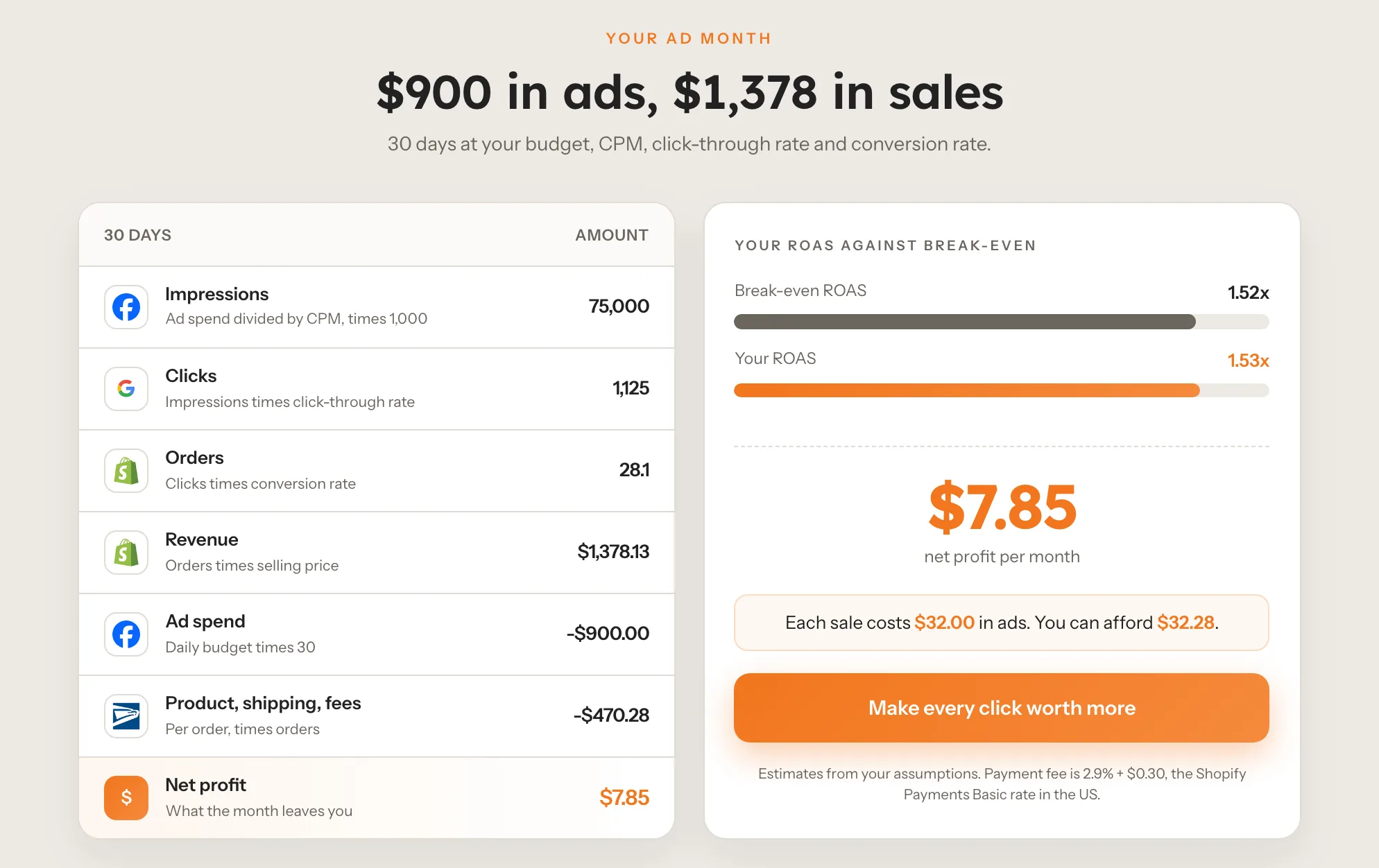
- A $49 product with $15 of product and shipping cost keeps $32.28 after the 2.9% + 30¢ payment fee. Its break-even ROAS is $49 ÷ $32.28, or 1.52x. A 2.25x ROAS is a clear profit.
- A $30 product with $18 of product and shipping cost keeps $10.83 after the fee. Its break-even ROAS is $30 ÷ $10.83, or 2.77x. The same 2.25x ROAS loses money on every sale.
So a good Facebook ROAS for the first store is a losing one for the second. To see what's left of each price across your catalog, the free profit margin calculator works out the margin per product. Start from your break-even ROAS, then use the benchmarks to see if your target is realistic for your industry.
How to Find a Good ROAS for Your Store With the ROAS Calculator?
Open the ROAS calculator, enter your budget, price and costs, and it shows your break-even ROAS, your likely ROAS and your monthly profit at once. The steps below set it up for Facebook ads.
Step 1: Enter Your Daily Budget, Price and Costs
Type your daily ad budget, the selling price and the product plus shipping cost of one order. The calculator adds the payment fee by itself: 2.9% + $0.30, the Shopify Payments Basic rate in the US.
Step 2: Use Your Own Facebook Ads Numbers
Change CPM, click-through rate and conversion rate to the numbers in your Ads Manager. The defaults are a $12 CPM, a 1.5% click-through rate and a 2.5% conversion rate. Real numbers change by niche, creative and country, so your own beat any default.
Step 3: Compare Your ROAS With Break-Even
Read your ROAS next to your break-even ROAS, then check ad cost per sale against what you can afford per sale. With the defaults, a $49 product breaks even at 1.52x, the ads reach 1.53x, and the month leaves about $8 on $900 of ads.
Step 4: Try the What-If
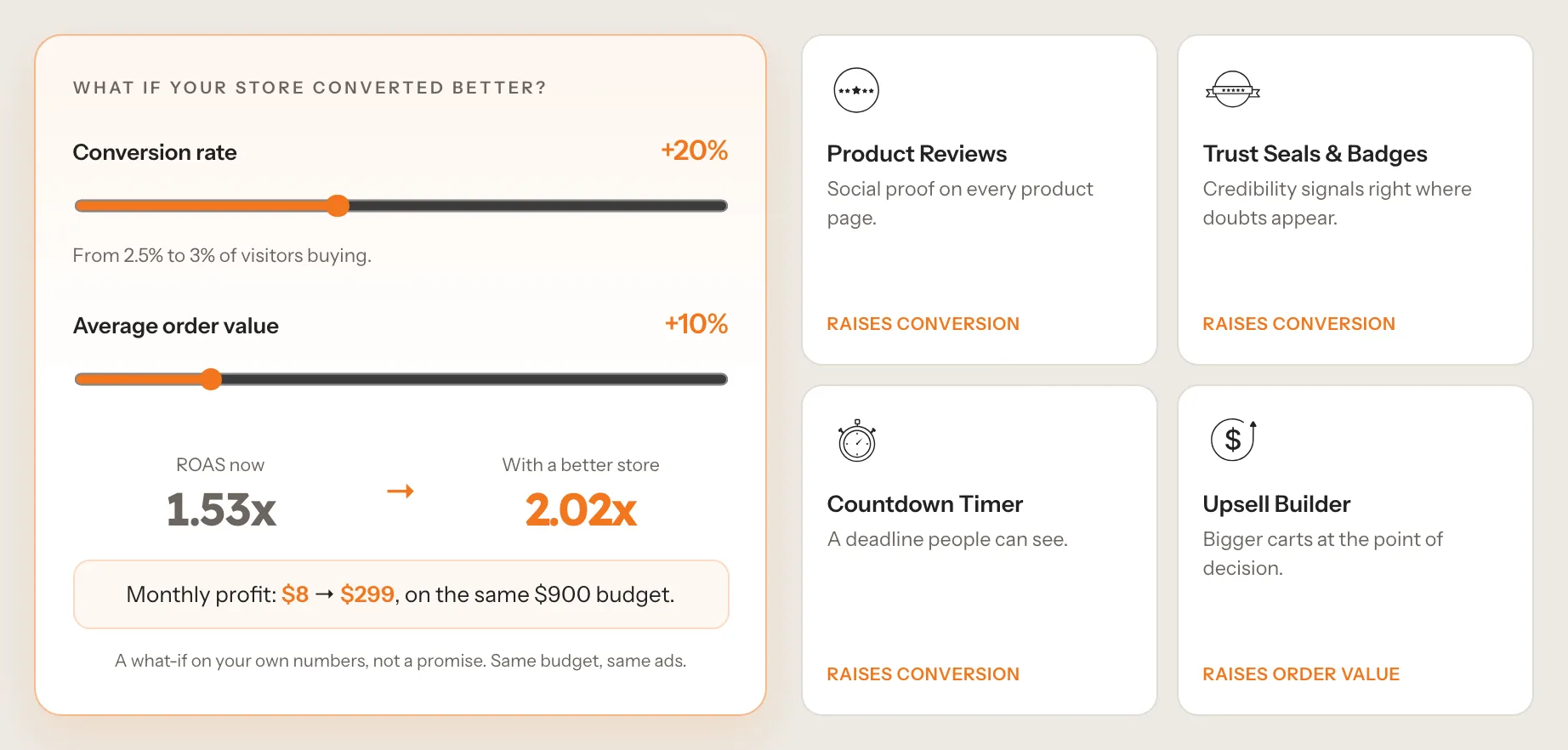
Move the conversion rate and order value sliders to see what a better store does to ROAS on the same budget. A 20% better conversion rate and a 10% bigger order value take the default example from 1.53x to 2.02x, and monthly profit from $8 to $299.
How Much Above Break-Even Should Your Facebook ROAS Be?
Your ROAS should be far enough above break-even that the profit it leaves covers your monthly costs and pays you. The calculator marks a ROAS less than 1.3 times break-even as "just above break-even", and the default example shows why: 1.53x against 1.52x leaves about $8 a month.
To set a target, work backwards from profit:
- Decide how much profit a month the ads have to leave, after your Shopify plan, apps and other monthly costs
- Enter your numbers in the calculator and raise the conversion rate or price until net profit per month reaches that amount
- The ROAS on screen at that point is your target ROAS for those ads
A store that's testing new ads to find buyers can accept a ROAS near break-even for a few weeks. A store that runs the same ads month after month needs a ROAS that leaves a real profit.
How to Increase Sales From Facebook Ads Without Raising Your Budget?
You raise ROAS on the same budget by turning more of the same clicks into orders, and by making each order bigger. The ad brings the visitor. The product page decides if they buy.
- Show reviews from real buyers. The Vitals Product Reviews app shows reviews with photos and videos, plus star ratings, so shoppers who came from an ad and don't know your store yet see proof from real buyers.
- Answer doubts at the buy button. The Vitals Trust Seals & Badges app shows seals such as Secure ordering, Money back guarantee and Free shipping next to the buy button.
- Show when the sale ends. The Vitals Countdown Timer app shows a countdown to your sale's real end date on product pages, for ads that promote a sale.
- Make each order bigger. The Vitals Upsell Builder app creates volume discounts, bundles, buy X get Y, free gifts and one-click post-purchase offers.
Reviews already show up in real orders. In our data from 8,832 Shopify stores using the Vitals Product Reviews app, the reviews widget is part of 0.8% of orders at the median store with 1,000+ review views and 5.0% in the top 10%. These figures are attribution, not a controlled test: they show how often shoppers use the widget on the way to an order, not how many orders it created.
For more apps that raise order value, see our list of the best Shopify apps to increase AOV.
Why Does Facebook Show a Different ROAS Than Shopify?
Facebook and Shopify count sales in different ways, so the ROAS in Ads Manager rarely matches what your Shopify orders show. These four gaps explain most of the difference:
- Different attribution. Ads Manager credits a purchase to an ad by its own attribution setting, and Shopify credits orders by its own rules. Compare the two over the same dates, and trust Shopify for your total orders.
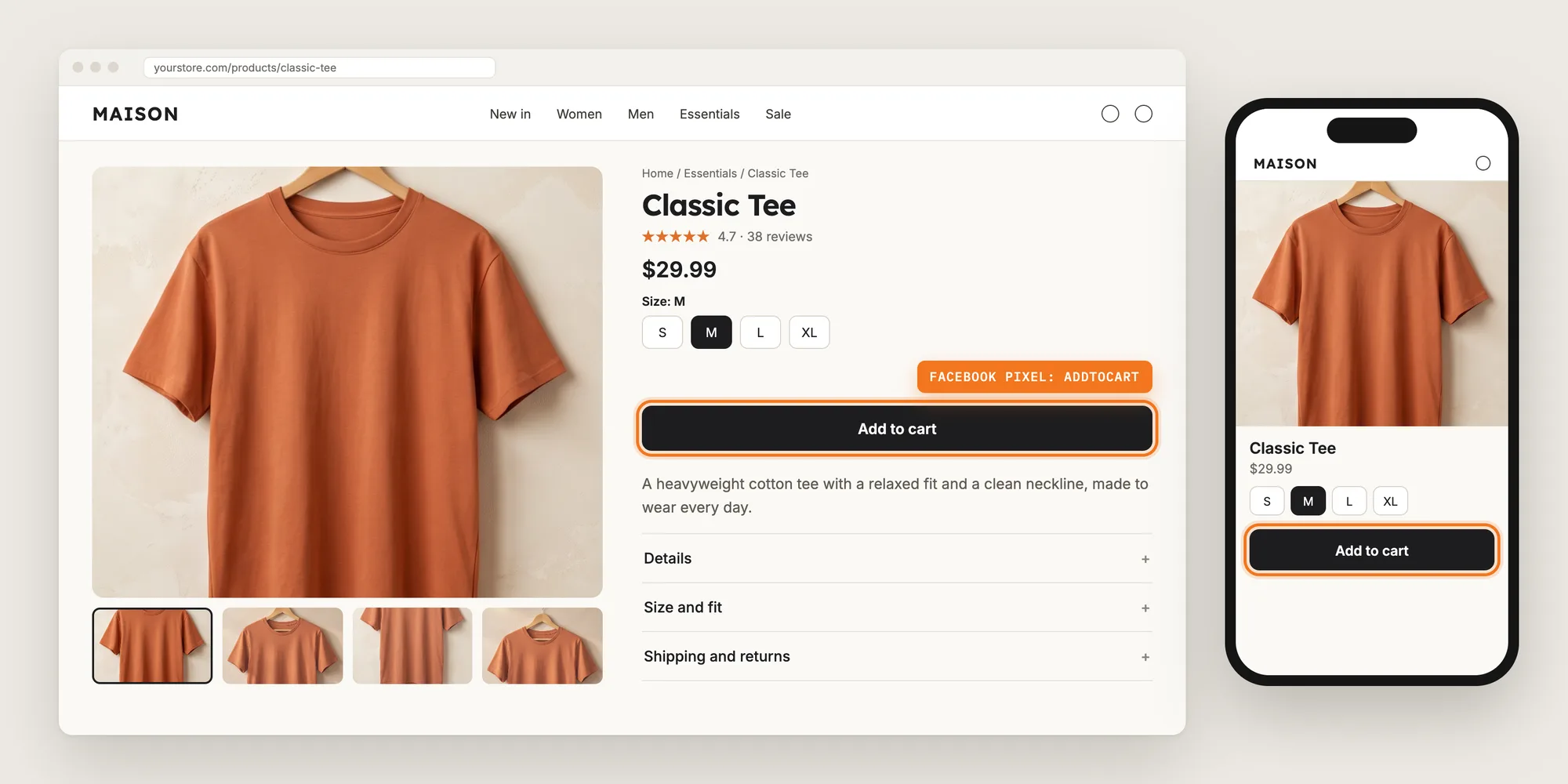
- Purchases that never reach Meta. If your pixel doesn't send every Purchase event, Ads Manager shows a lower ROAS than the ads really bring. Our guide on how to add Facebook Pixel to Shopify covers the setup. The Vitals Facebook Pixels app can also send each order's Purchase event to Meta through the Conversions API once you paste a Meta access token on the pixel.
- Refunds still counted. A returned order still counts as an ad sale in Ads Manager. Take your refund rate off before you compare ROAS with break-even.
- One ROAS for the whole store. A store-wide ROAS can hide a product that loses money on every sale. Compare ROAS with break-even per product, or at least per price range.
Which ROAS Target Should You Use?
Use the target that comes from your own numbers, and keep benchmarks as a check.
- Choose the free ROAS calculator if you want your break-even ROAS, ad cost per sale and monthly profit for one product in a minute
- Choose published benchmarks if you want to know whether your target is realistic for your industry
- Choose the break-even formula by hand if you're checking one product before you launch an ad and already know your costs
Start your free trial: Install the Vitals - All in One App from the Shopify App Store
Frequently Asked Questions
1. What is a good ROAS for Facebook ads on Shopify?
A good ROAS is one clearly above your own break-even ROAS. Vitals' free ROAS calculator is the quickest way for most stores to find it, from their price, product and shipping cost and the Shopify Payments fee. As a range, Databox reported a 2.25 median for ecommerce, and Shopify's 2026 roundup lists 2.1 to 3.2 by industry.
2. Is a 2x ROAS good on Facebook?
It depends on your margin. A 2x ROAS is a profit if more than half of your price is left after product, shipping and fees, because then your break-even ROAS is under 2x. If less than half is left, a 2x ROAS loses money.
3. Is a 4x ROAS good?
For most products, a 4x ROAS is well above break-even, because a product only needs 4x to break even when just a quarter of its price is left after costs. It's also above every Facebook benchmark in the table on this page. Check your break-even ROAS to be sure.
4. What is the average ROAS for Facebook ads?
The sources we read give 1.64 as the median for small and medium businesses and 2.25 as the median for ecommerce companies (Databox), and 2.1 to 3.2 by industry for Meta ads (Shopify, citing Ryze AI). They're measured on different groups and dates, so use them as a range.
5. Should I turn off a Facebook ad below break-even ROAS?
Not straight away if the ad is new or you're testing. A new ad often needs time and data before its ROAS settles. An ad that stays below break-even for weeks loses money on every sale, so change the ad, the offer or the product page, or turn it off.
6. How do I increase my Facebook ads ROAS?
Raise your conversion rate and your order value. Reviews, trust badges and a clear sale deadline turn more of the same clicks into orders, and bundles and volume discounts make each order bigger. On the calculator's default example, 20% more conversion and 10% more order value take ROAS from 1.53x to 2.02x.
7. Why is my Shopify ROAS lower than Ads Manager?
Ads Manager and Shopify use different attribution, so Ads Manager can credit a purchase to an ad that Shopify credits to another source. Compare both over the same dates, and use Shopify for your total orders.