What Is a Good Profit Margin for a Shopify Store?


A good profit margin for a Shopify store is a gross margin near 50% and a net margin near 10%. That's the top of the ranges Shopify gives for retail: 30% to 50% gross and 2% to 10% net.
The quickest way to see where your store stands is the free Profit Margin Calculator. Enter your price and costs and it shows your profit per sale, your margin and the ROAS you need to break even. No signup.
Many stores look at the gap between price and product cost and call it margin. Then shipping, ads and payment fees take most of that gap before the money reaches the bank. Two stores can pay the same for a product and still end up with very different profit.
What Is a Profit Margin?
A profit margin is the share of each sale you keep after costs, written as a percentage of the selling price. A $30 sale that leaves you $9 has a 30% margin.
Three margins matter for a Shopify store:
- Gross margin counts only the cost of the product itself
- Margin per sale also takes out shipping, ad cost, payment fees and packaging for that order
- Net margin takes out every cost of the business, including your Shopify plan, apps, salaries, taxes and interest
Shopify's formula for gross margin is (net sales minus cost of goods sold) divided by net sales, times 100. Net margin is net income divided by total revenue, times 100. Margin per sale sits between the two, and it's the number you can change order by order.
What Are the Average Profit Margins for Retail?
Retail gross margins average 30% to 50%, and net margins average 2% to 10%, according to Shopify's guide to profit margins (March 2026).
Margins also change a lot by category. The NYU Stern margins by industry data (January 2026, US public companies) shows how far apart they sit:
Apparel is the clearest lesson in the table. Its gross margin is the highest of any row, yet it keeps only 3.85% as net margin. The costs that come after the product took almost all of the gap.
A good margin depends on what you sell. Compare your store with its own category, and judge gross and net margin separately.
How Do You Check Your Own Margin per Sale?
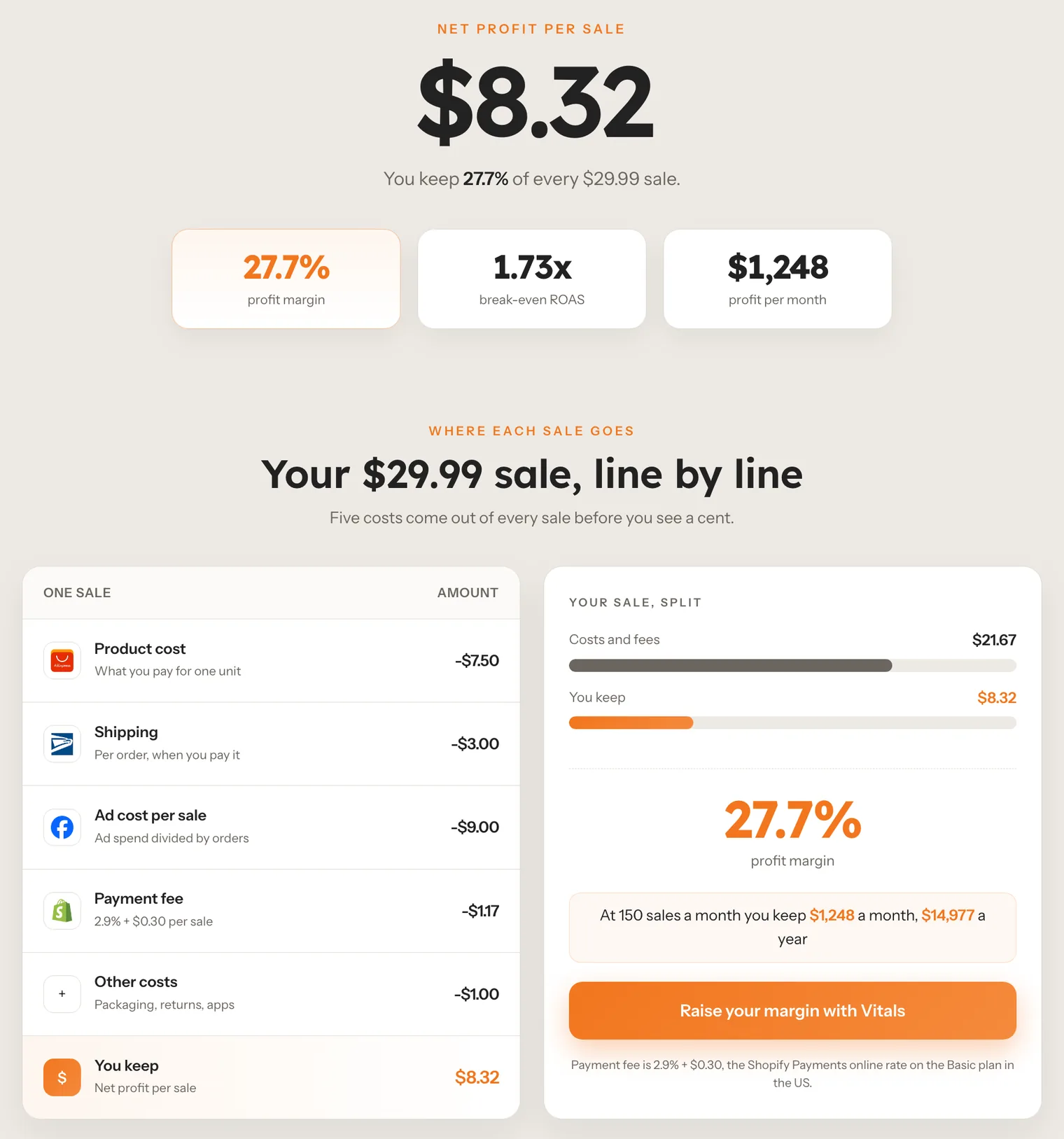
Open the Profit Margin Calculator and enter six numbers: selling price, product cost, shipping cost, ad cost per sale, other costs per sale and sales per month. It adds the payment fee for you at 2.9% + $0.30, the Shopify Payments online card rate on the Basic plan in the US, as Shopify lists it in its guide to credit card processing fees.
The math behind it:
- Payment fee = 2.9% of the price + $0.30
- Profit per sale = price - product cost - shipping - ad cost - other costs - payment fee
- Margin = profit per sale ÷ price × 100
In the example, the fee is $1.17 and you keep $8.32 of every $29.99 sale, a 27.7% margin. At 150 sales a month, that's $1,248 before your monthly fixed costs.
Why Is Your Margin Lower Than It Looks?
The same $29.99 product has a gross margin of 75%, because the product costs $7.50. After shipping, ads, the payment fee and packaging, the margin per sale drops to 27.7%. Ad cost alone takes $9.00, more than the product.
That 27.7% isn't your net margin yet. Your Shopify plan, your apps, returns and anything else you pay each month still come out of the $1,248. Divide those monthly costs by your sales per month to see how much more each sale has to keep. With 150 sales a month, every $150 of monthly costs takes another $1 off each sale.
A store can look healthy on gross margin and still lose money. Check the margin per sale first. When ads take most of each sale, more traffic makes the problem bigger, not smaller.
What Margin Do You Need to Pay for Ads?
Your ads break even when your return on ad spend (ROAS) equals your break-even ROAS. The formula is price ÷ (price - product cost - shipping - other costs - payment fee).
In the example, $29.99 ÷ $17.32 = 1.73x. Each $1 of ad spend has to bring back $1.73 in sales just to cover the ad and the costs of those sales. Below 1.73x, every extra order loses money, and more ad spend makes the loss bigger.
A lower product cost or a higher price brings the break-even ROAS down, which gives your ads more room. To check a campaign's real return against that number, use the ROAS Calculator.
How to Increase Profit With a Bigger Order Value?
A bigger order raises your profit without more ads, because shipping and ad cost usually stay the same when a customer adds one more item. You already paid to bring that customer to the store.
Take the example again. If the customer buys two units in one order at 10% off the pair, the order is $53.98. Product cost doubles to $15.00 and the fee rises to $1.87, while shipping, ad cost and other costs stay at $13.00. Profit per order goes from $8.32 to $24.11, a margin of 44.7%.
You can try this with your own numbers in the calculator's "What if your orders were bigger?" section. These are the usual ways to raise order value on Shopify:
- Show an add-on offer on the product page or in the cart with the Vitals Upsell Builder app
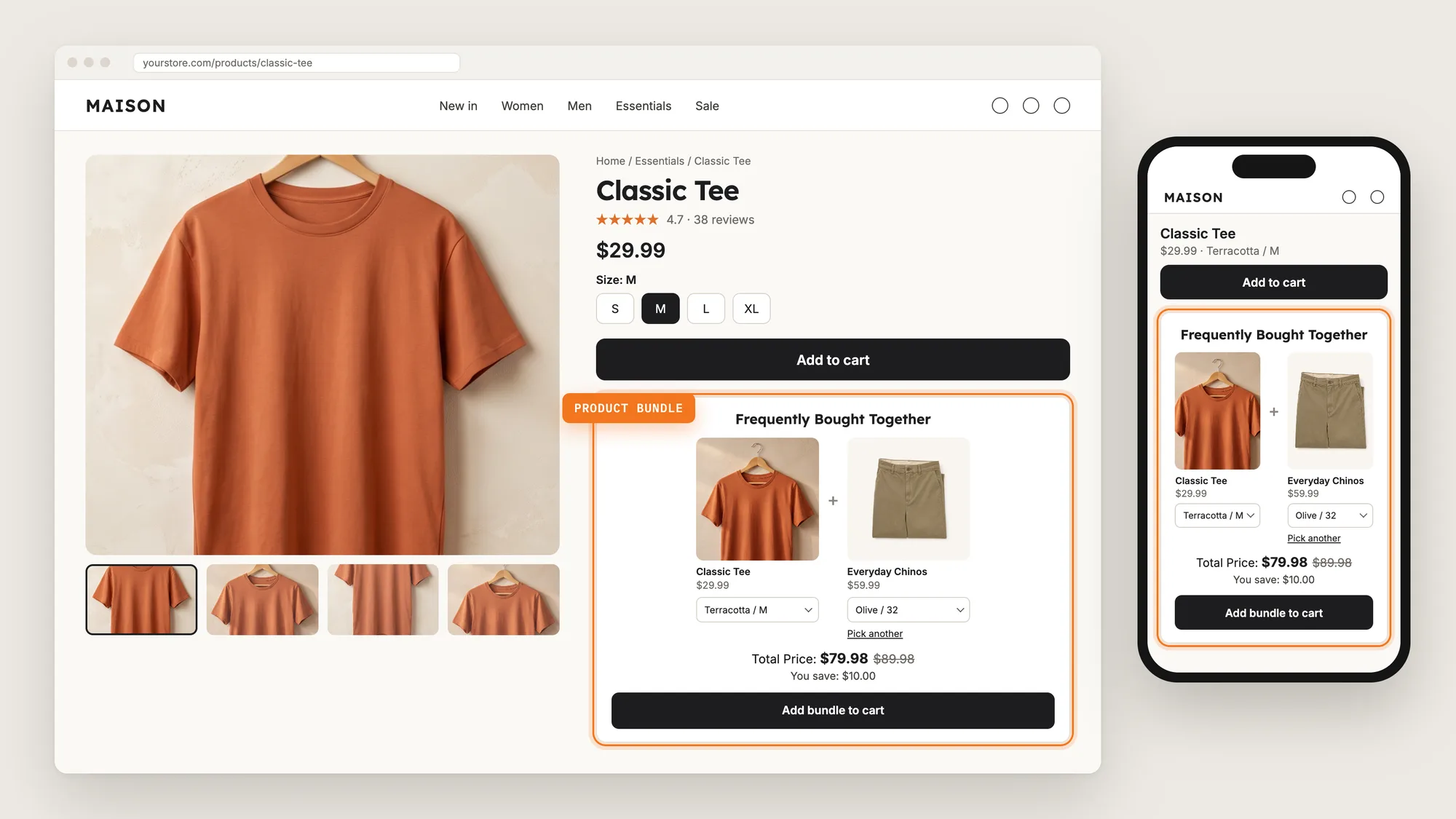
- Sell products that go together as one priced set with the Vitals Product Bundles app, as in our guide on how to create product bundles on Shopify
- Lower the price per unit as the quantity goes up with the Vitals Volume Discounts app
- Keep offers in front of the shopper while the cart is open with the Vitals Cart Drawer app
Upsell offers don't need to win often to pay off. In our data from 6,484 Shopify stores using the Vitals Upsell Builder app, 4.8% of orders involved an offer at the median store with 1,000+ offer views, and 26.2% in the top 10%. For more ways to grow order value, see our list of the best Shopify apps to increase AOV.
- Vitals - All in One App is the quickest way to add upsells, bundles and volume discounts to a Shopify store
- Vitals also offers 40+ apps, such as Upsell Builder, Product Bundles, Volume Discounts and Cart Drawer, in one subscription from $29.99/month, so you don't have to install and pay for each app separately
Which Profit Margin Should Your Store Aim For?
Aim for a margin per sale that pays your ads, covers your monthly costs and still leaves a net margin of about 10%. That's the top of Shopify's retail range, and it gives you room for a bad month of refunds or a rise in ad prices.
Work it out in this order:
- Find your margin per sale with the calculator
- Check that your ROAS is above your break-even ROAS
- Take your monthly fixed costs off the monthly profit
- Divide what's left by your monthly sales revenue to get your net margin
If the net margin comes out under the averages in the table, start with order value, then price, then product and shipping costs. Cutting ad spend comes last, because it usually cuts sales too.
Frequently Asked Questions
1. Is a 30% profit margin good for a Shopify store?
It depends on which margin. A 30% gross margin is the bottom of Shopify's 30% to 50% retail range, so there's little left for shipping and ads. A 30% net margin is well above every retail average in the table above.
2. What's the difference between gross margin and net margin?
Gross margin takes out only the cost of the product. Net margin takes out every cost of the business, including shipping, ads, fees, apps and your Shopify plan. Net margin is the one that shows whether the store makes money.
3. Is markup the same as profit margin?
No. Markup is profit divided by product cost, while margin is profit divided by the selling price. A product that costs $20 and sells for $30 has a 50% markup and a 33.3% margin.
4. Which payment fee should I count in my margin?
Count the rate you pay. Shopify lists 2.9% + $0.30 for online cards on the Basic plan in the US, and the Profit Margin Calculator uses that rate. Higher plans and other countries have different rates.
5. What ROAS do I need to break even?
Divide your selling price by what's left after product cost, shipping, other costs and the payment fee. A $29.99 product with $17.32 left needs a 1.73x ROAS. Below that, each sale from ads loses money.
6. How do I raise my margin without spending more on ads?
Raise your order value. Upsells, bundles and volume discounts add items to orders you already paid to win, while shipping and ad cost stay the same. Then look at your prices and your product and shipping costs.
7. Is the Profit Margin Calculator free?
Yes. The Profit Margin Calculator is free and needs no signup. It shows your profit per sale, margin, break-even ROAS and profit per month, and what bigger orders would change.