
TL;DR
A Shopify theme detector tells you which theme any store runs, so you can shortcut design research instead of guessing from source code.
I tested five tools against the same set of stores and scored each on detection accuracy, what it shows beyond the theme name, whether it charges or gates results, and how fast it returns an answer.
Vitals ranks first because it names the theme, lists every app running alongside it, and prices those apps out, all in one free scan with no signup.
Here's how the rest compare.
Introduction
You find a Shopify store with a layout you'd want to copy tomorrow, and the first question is always the same: what theme is that? You can dig through the page source for a Shopify.theme string, but that breaks the moment a store renames or heavily edits its theme. A theme detector reads the same public signals every visitor's browser loads and returns the theme name in seconds.
The design is only half the story. The theme sets the layout, but the apps a store installs decide how it converts: the reviews, the upsells and bundles, the urgency timers, the email capture. A tool that names the theme and stops there answers half your question. This roundup weighs both, because researching a store you admire means understanding how it looks and how it sells.
I compared the five best Shopify theme detectors on the criteria that decide whether a tool saves you time or wastes it. Below is how I scored them, then each tool measured against that bar.
How I selected the best Shopify theme detectors
I scored every tool against four fixed criteria, each rated independently rather than head-to-head:
- Detection accuracy. Does it name the theme correctly on customized and renamed stores, and does it admit when a theme is custom instead of guessing? Every tool here concedes that fully bespoke and headless builds can't be matched, which is the honest answer.
- What it shows beyond the theme name. The theme is a starting point. The stronger tools also surface which apps a store runs, their pricing, or a live preview, so you leave with a fuller picture.
- Cost and gating. Free matters less than what a tool asks for in return. Some run the scan instantly with no barrier. Others require an email, an account, or a browser extension before they show a result.
- Speed to answer. How many steps stand between pasting a URL and reading the theme name.
The best Shopify theme detectors in 2026
1. Shopify Theme Detector
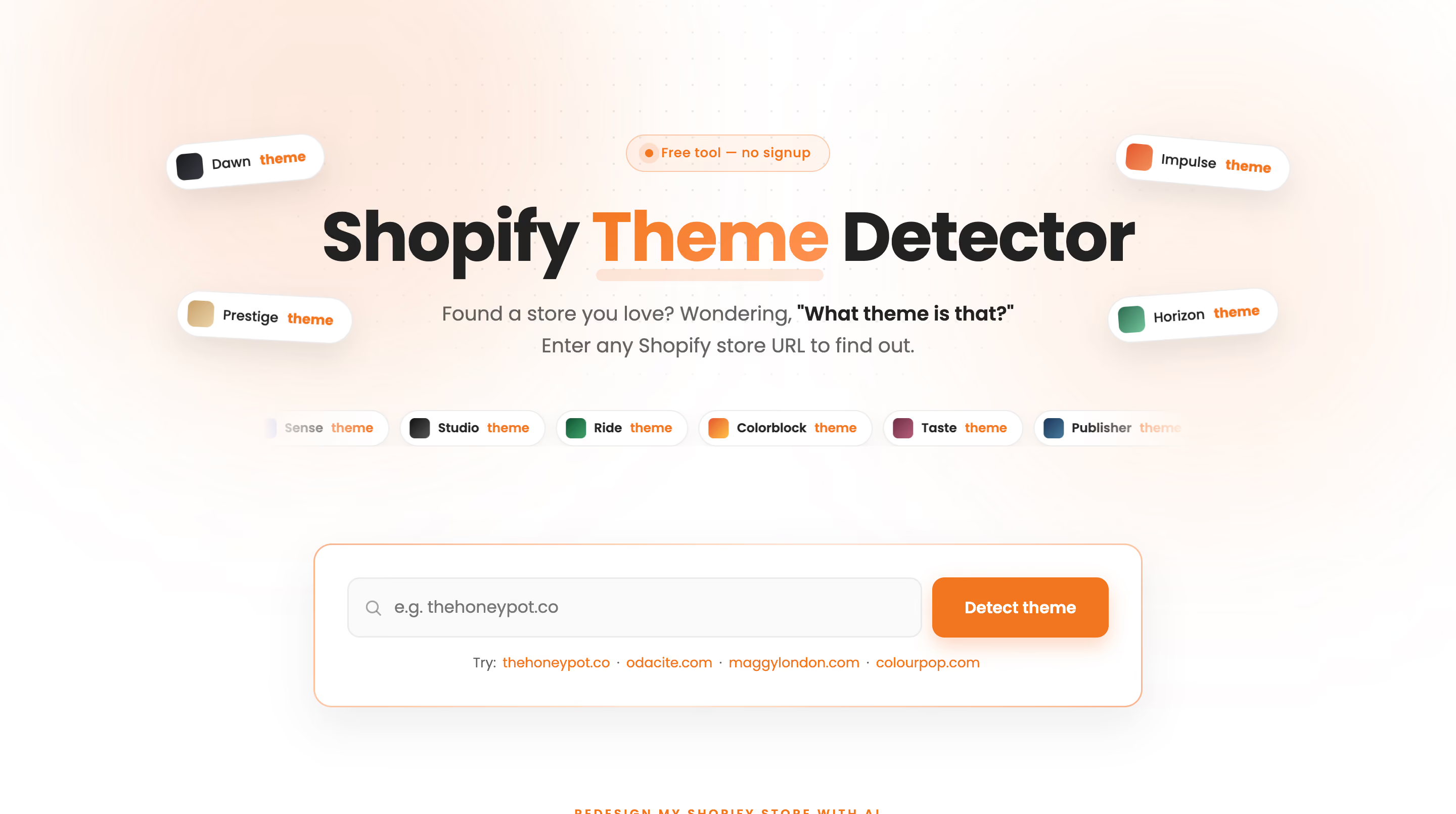
Vitals Shopify Theme Detector identifies the theme behind any store, and it detects the apps running alongside that theme in the same scan, with each app's typical monthly price.
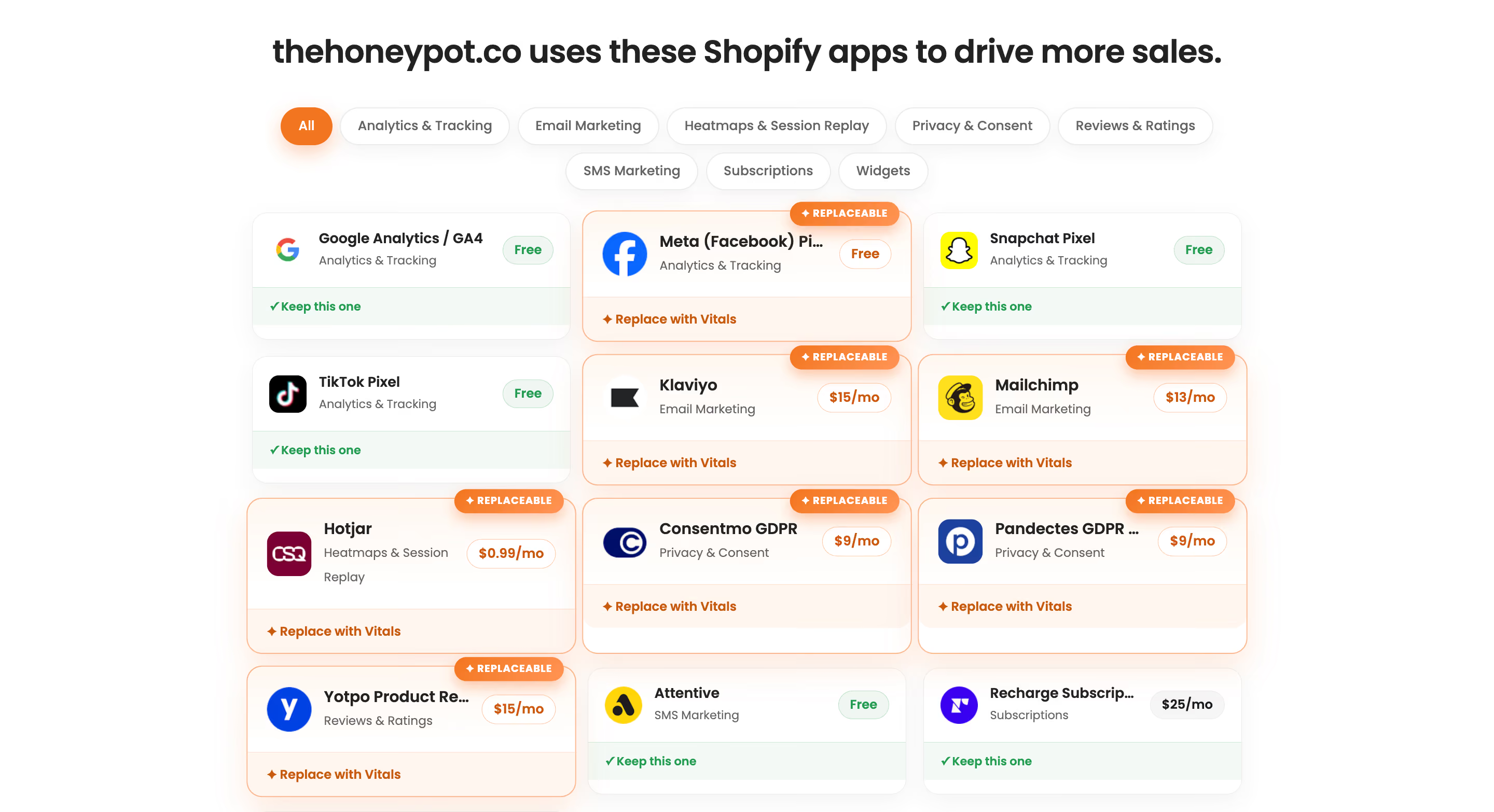
With Vitals, you paste a store URL and get three things back: the theme name, a category-by-category breakdown of the apps the store runs to convert visitors, from review apps to session replay tools, and a live preview screenshot. The tool identifies the theme even when a merchant has renamed it, and it flags custom or unlisted themes rather than returning a false match. There's no signup, no email capture, and no redirect between you and the result.

The app breakdown takes the scan past a plain theme lookup. When you're studying a store you admire, you learn which reviews app, which upsell app, and which email capture tool it uses, plus what each one costs on the Shopify App Store.
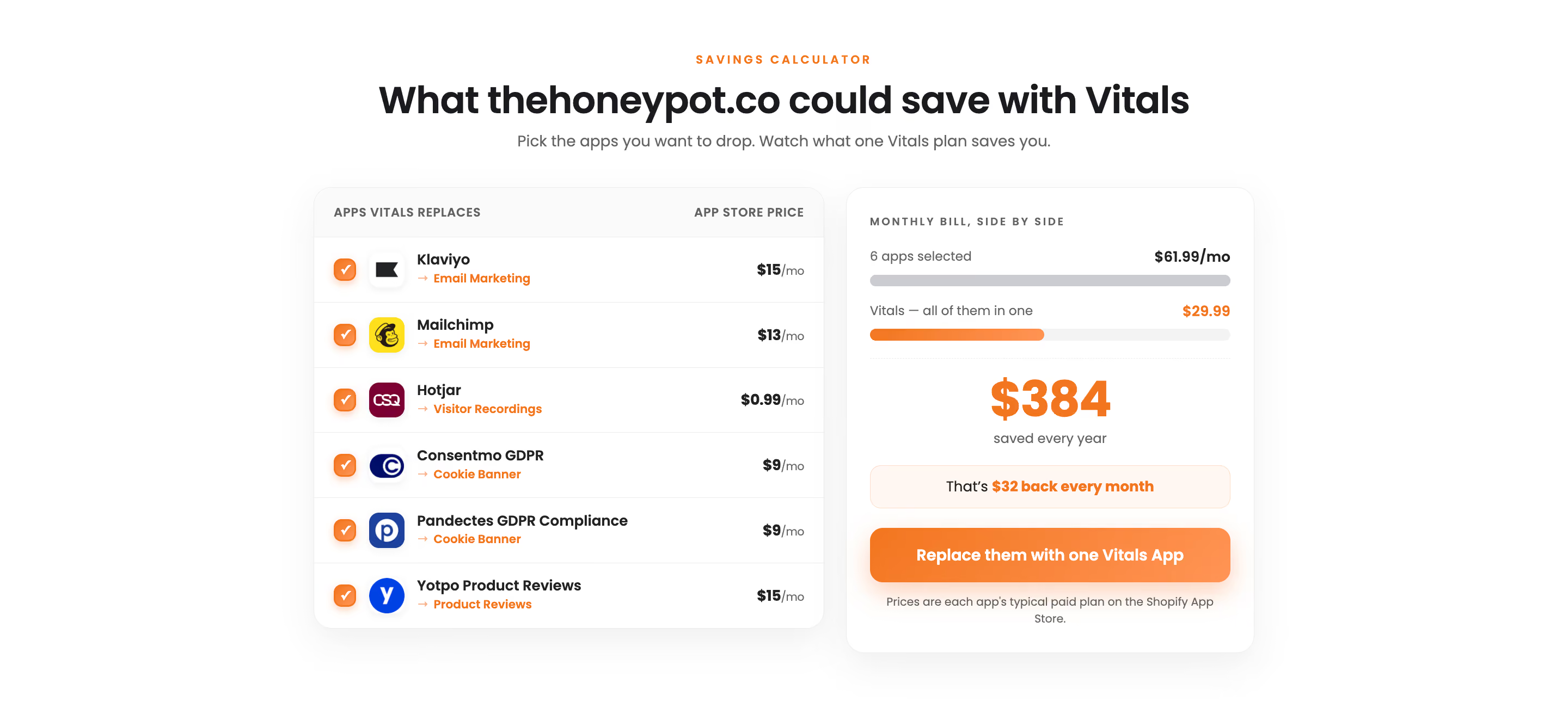
A built-in savings calculator then shows what those same apps would cost bundled into Vitals' single subscription instead. You leave with a full blueprint of the store, not just a theme name.
Key features
- Theme detection that holds up on renamed and customized stores.
- A full app breakdown grouped by category, so you see the reviews, upsell, and email capture tools a store runs.
- Each detected app's typical monthly Shopify App Store price.
- A live preview screenshot of the storefront.
- A savings calculator comparing the store's app costs against one Vitals subscription.
- No signup, email, or extension required.
Pricing
The Shopify Theme Detector is free with no account. The Vitals app suite itself, which powers the detector, costs $29.99/month for 40+ conversion apps and replaces the 6-8 separate apps most stores install to do the same jobs.
If you're weighing app consolidation, this breakdown of the best all-in-one apps for Shopify is a useful next read.
Pros and cons
Pros: names the theme and every app a store runs in one scan; prices the apps out; works on customized stores; nothing gated behind a form.
Cons: the deeper app-and-pricing breakdown is most useful to merchants researching how a store converts, less so to someone who only wants a theme name and nothing else.
Why do Shopify brands choose Vitals' Shopify Theme Detector?
Shopify brands choose the Vitals detector because it answers the whole question in one scan. Most detectors return a theme name and stop, which leaves you to work out separately how the store actually converts. Vitals names the theme, lists the apps running with it, and shows what those apps cost, so a single scan gives you both the design and the conversion setup behind a store you want to learn from. It's built by the team behind the all-in-one Shopify app trusted by 30,000+ merchants with 2,780+ five-star reviews.
If you want to go further than research, CreateMyStore by Vitals builds a complete Shopify store from a niche in minutes, with design, products, copy, reviews, and 40+ Vitals apps already installed. It's free to build, and it's one of the best AI store builders for Shopify if you'd rather generate a store than research one.
2. True Profit

True Profit theme detector analyzes the public code of any store and returns theme-related information in seconds.
You paste a URL and the tool scans the store's front-end data, then returns the theme ID, theme name, and theme developer. It identifies whether a store runs a custom theme or a marketplace theme. The scan needs no installation or store access. True Profit also offers a separate Shopify App Detector and a Chrome extension, so app detection lives in a different tool rather than in the theme scan itself.
Key features
- Returns theme ID, theme name, and theme developer.
- Flags custom themes versus marketplace themes.
- No installation or store access required.
- A separate Shopify App Detector lists the apps a store runs.
- A Chrome extension for detection while you browse.
Pricing
The Shopify Theme Detector is free. True Profit's core profit-analytics product is a separate paid subscription; check trueprofit.io/pricing for current rates.
Pros and cons
Pros: free and unlimited; clean theme, version, and developer output; no signup for the scan.
Cons: app detection sits in a separate tool, so you run two scans to see both the theme and the apps behind it.
3. Zik Analytics

Zik Analytics theme detector identifies the theme behind any store and pulls a store profile alongside it.
You paste a URL and Zik returns the theme name with a live preview. The results also show the store's social channels, selling currency, store language, and the store's creation date. That profile makes the tool a fit for competitor research, since one scan surfaces where a store advertises and which markets it targets. Going deeper, into best-selling products, sales volume, and estimated revenue, requires an account.
Key features
- Theme name with a live store preview.
- A store profile: social channels, ad channels, currency, language, and creation date.
- Installed-app detection.
- Best sellers, sales volume, and estimated revenue behind a free signup.
Pricing
The theme name and store profile are free without an account. Deeper sales and revenue data need a free registration, and Zik's full platform is a paid subscription that starts with a $1 trial; check zikanalytics.com/pricing for current plan rates.
Pros and cons
Pros: rich store profile beyond the theme; ad-channel and market data useful for competitor work; live preview.
Cons: the data most sellers want, sales and revenue, sits behind a signup; the tool is built around eBay and Shopify product research rather than theme detection alone.
4. Koala

Koala theme detector runs as a free online tool. You paste a store URL into the online tool, and the theme name returns in a few seconds. The online tool needs no account or install. Koala identifies heavily customized versions of existing themes, including stores that changed colors, layouts, or section names, and it returns a theme listing link when the match is a Theme Store theme. A fully bespoke theme built from scratch won't match, which Koala states plainly.
Key features
- A free online tool plus a one-click Chrome extension.
- Theme detection on customized and renamed stores.
- A Shopify Theme Store link when the match is a catalogued theme.
- Broader competitor insights through the Koala Inspector extension.
Pricing
The theme detection feature is included in Koala Inspector's free plan, which stays free with 15 tokens per month. Paid plans start at $22/month and add more tokens, tracking for up to 50 stores, and priority support. One-time token packs start at $3.99 for 10 tokens.
Pros and cons
Pros: instant scan with no signup on the online tool; handles customized themes well; direct Theme Store links.
Cons: the deeper store insights sit inside the Inspector extension and its token system, so heavier research draws down a monthly token allowance.
5. Whatmore
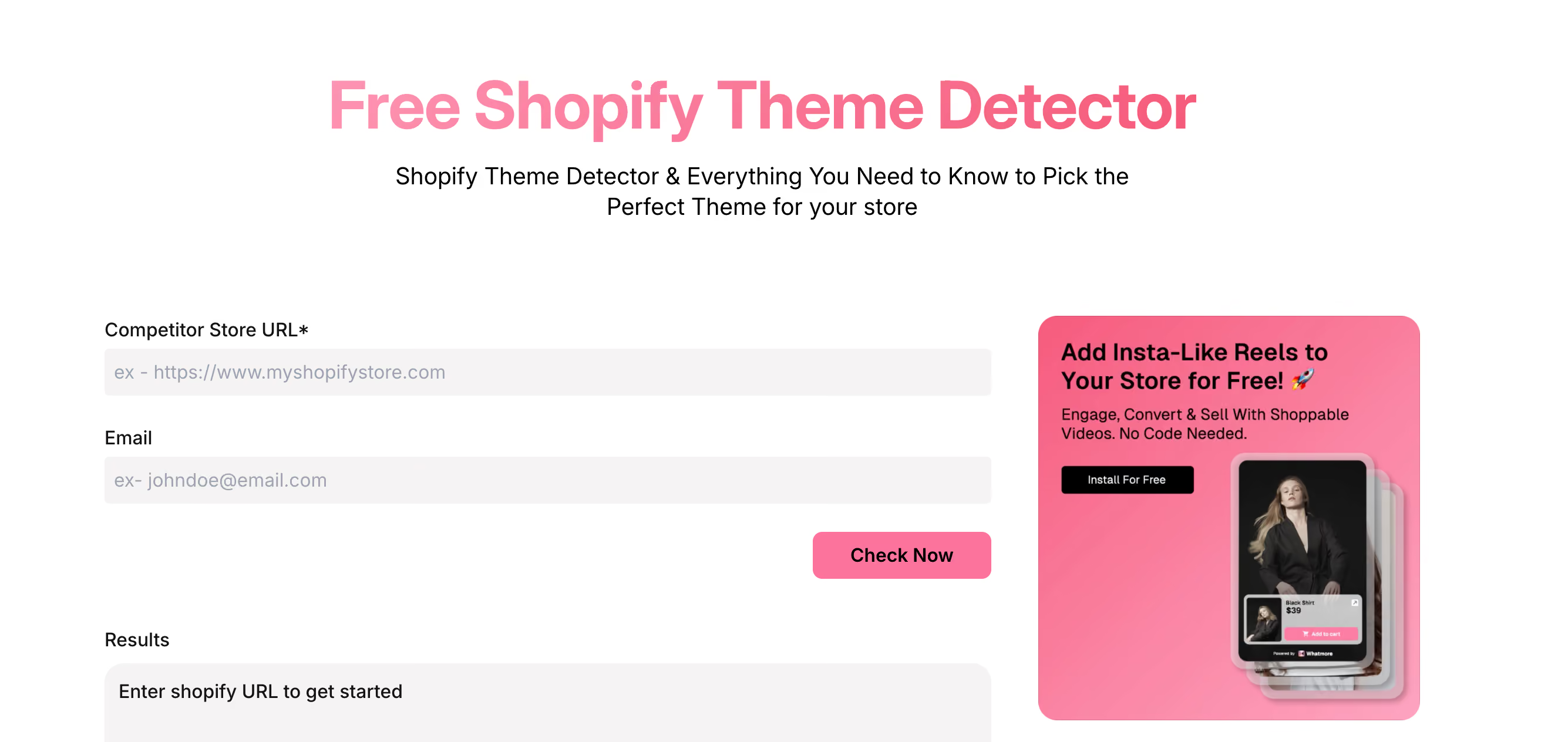
Whatmore is a shoppable-video app for Shopify. Its Theme Detector identifies the theme behind a store and pairs the tool with a long guide on choosing a theme.
You enter a competitor store URL along with your email address, then run the scan to get the theme result. Whatmore states a 99.9% accuracy rate and says the tool returns the theme name and version, developer information, a price point, and performance metrics including page load speed and mobile responsiveness. It describes a batch-processing option for scanning several stores at once. The accuracy figure and the metric claims are Whatmore's own; I haven't independently verified them, and the email requirement means the scan isn't gate-free.
Key features
- Theme name and version with developer and price-point information, as described by Whatmore.
- Performance metrics including load speed and mobile responsiveness, per Whatmore's claims.
- A batch option for analyzing multiple stores.
- An extensive written guide on theme selection.
Pricing
The theme detector is free to use, but running a scan requires entering an email address. Whatmore's shoppable-video app has its own separate pricing; check whatmore.ai for current plans.
Pros and cons
Pros: reports theme, version, and performance metrics in one place; batch scanning for bulk research.
Cons: the scan requires an email before it returns a result; the headline accuracy and metric claims are unverified vendor statements rather than independently confirmed.
Final thoughts
Every tool here names a theme. The one that saves you the most time is the one that answers the rest of the question in the same scan, because the theme tells you how a store looks and the apps behind it tell you how it sells. Vitals ranks first for that reason: it names the theme, lists the apps running with it, and prices them out, free and without a signup. True Profit and Koala are strong, clean picks when you want a fast theme name with nothing gated. Zik suits deeper competitor profiling, and Whatmore adds performance metrics if you're willing to trade an email for the scan.
Frequently asked questions
1. What is a Shopify theme detector?
A Shopify theme detector is a free tool that identifies which theme a Shopify store runs, even after the merchant has renamed or customized it. It reads the public signals a store loads for every visitor and returns the theme name in seconds, with no access to the store required.
2. Which is the best Shopify theme detector?
Vitals ranks first because it identifies the theme even when a merchant renames it and detects the apps running on the store at the same time, with each app's typical monthly price. Most detectors stop at the theme name. Your best choice depends on whether you want only the theme name or the full conversion setup behind a store.
3. How do I find out which theme a Shopify store uses?
Paste the store's URL into a theme detector and run the scan. Most tools return the theme name in a few seconds, and several add a live preview screenshot, with no login or browser extension needed for the basic scan.
4. Can a theme detector identify custom-built themes?
Not reliably. Fully bespoke themes built from scratch and headless storefronts aren't catalogued in the Shopify Theme Store, so a good detector flags the store as running a custom or unlisted theme rather than returning a false match. If you're set on a custom look, a Shopify page builder gives you that control without starting from scratch.
5. Are Shopify theme detectors free?
Most offer a free scan, though what they ask in return varies. Some run instantly with no barrier, while others require an email, a free account, or a Chrome extension before showing a result or deeper data.
6. What can a theme detector show besides the theme name?
The stronger tools surface the apps running on a store, since the theme and the apps together decide how it looks and converts. Some add a live preview, a store profile with ad channels and currency, or each app's monthly cost, so you leave with a fuller picture of how a store is built.